SMS / A2P registration
How users provide their phone number and consent to receive messages
Overview
This page documents how users of Aiva (aiva.family) add their phone number and give consent to receive SMS messages (Application-to-Person / A2P messaging registration). We collect explicit opt-in before sending any SMS. Two opt-in methods are available: web (in-app) and SMS keyword.
Required CTA elements
Our Message Flow / Call to Action includes all elements required by carriers and A2P registration:
- Brand: Aiva / Aiva Family
- Message frequency: Varies / conversational
- Terms: https://aiva.family/terms
- Privacy: https://aiva.family/privacy
- Message and data rates may apply.
- Opt-out: Reply STOP to unsubscribe.
Opt-in method 1 — Web
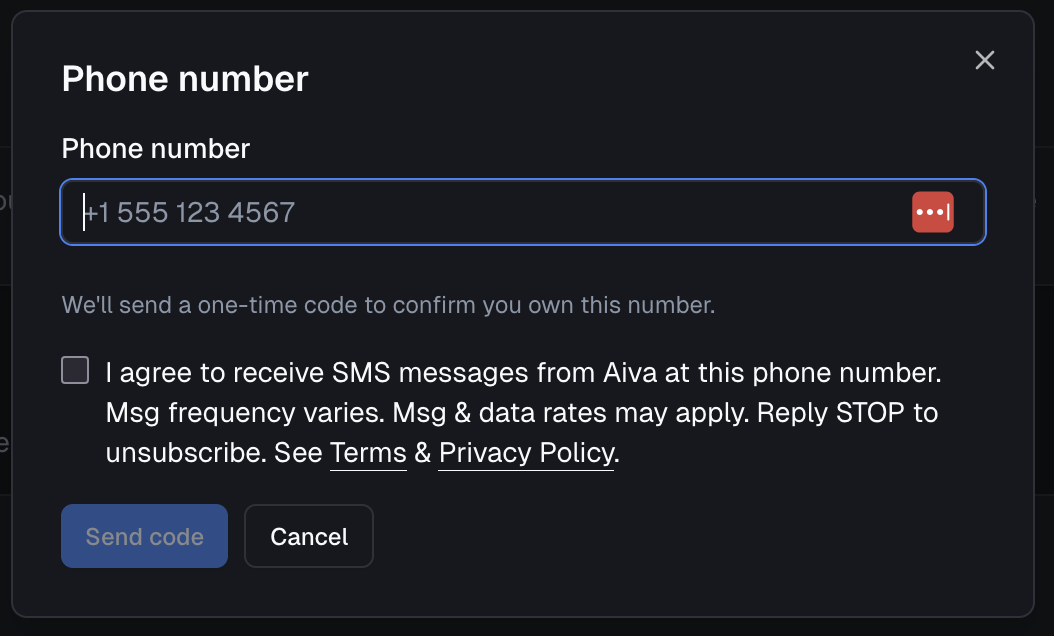
Users go to the app at https://aiva.family (after signing in), then Settings → family/members, where they can add or edit their phone number. Consent is collected via a required checkbox on the same form. The submit button is disabled until the box is checked. The exact wording shown is:
I agree to receive SMS messages from Aiva at this phone number. Msg frequency varies. Msg & data rates may apply. Reply STOP to unsubscribe. See Terms & Privacy Policy.
Terms and Privacy Policy link to https://aiva.family/terms and https://aiva.family/privacy. We do not send marketing SMS; messages are transactional (verification codes, assistant-related notifications, etc.). Users can opt out at any time by replying STOP.
Opt-in method 2 — SMS keyword
Users may text SUBSCRIBE or START to the campaign number. They receive one immediate automated reply that includes the brand (Aiva Family), standard message and data rates, and instruction to reply STOP to opt out. Terms and Privacy are available at the URLs below (and in the SMS reply as short links).
Exact first-reply text:
Aiva Family: You're opted in. Msg & data rates may apply. Reply NEXT to continue, STOP to opt out. Terms: aiva.family/terms Privacy: aiva.family/privacy
Consent form (web)
The image below shows the in-app form where users enter their phone number and grant consent.
Terms and Privacy
Full URLs for CTA submission and verification:
- Terms: https://aiva.family/terms
- Privacy: https://aiva.family/privacy